
$19 one-time digital purchase
Check the numbers before you book
Estimate cost per mile, test a proposed load and review recorded results for one truck with a six-tab Excel workbook.
Buy Download — $19 → · Questions about the kit?
Digital Excel (.xlsx) file. Save it to your device and clear the fictional examples before use. Your secure download link lasts 24 hours after the first download.
Free load-planning example
See how 150 deadhead miles change a $1,500 load estimate. Download a one-page PDF with a hypothetical worked example, including cost assumptions and estimated surplus. This is a fictional example, not a workbook screenshot or the paid Excel file.
Build your rate around your costs
Include every mile the load requires, including deadhead. Your fuel assumptions, monthly bills, reserves, driver pay, trip costs and fees all affect the estimate. Realistic monthly mileage matters: spreading fixed bills across too many planned miles can make your cost per mile look too low.
Six tabs in one Excel workbook
Start Here: setup instructions, field definitions and guidance on reading the results.
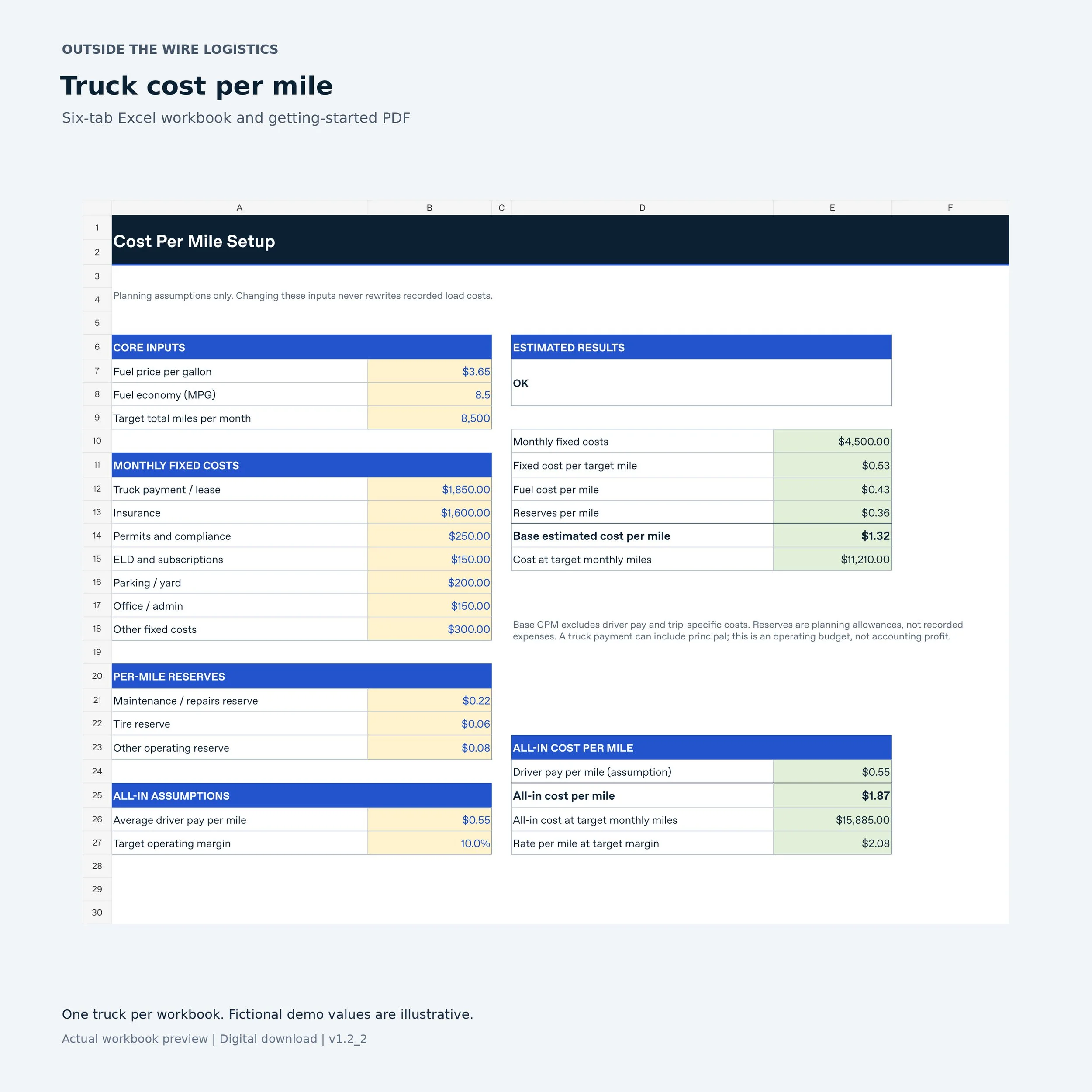
Cost Per Mile: fuel and fixed-cost assumptions, per-mile reserves, average driver pay and a target operating margin. See how different monthly mileage levels affect the estimate.
Load Calculator: a prospective load estimate with break-even and target-margin rates, deadhead share, and estimated surplus per mile and per day.
Monthly Tracker: actual revenue and trip-cost records for completed loads, with load contribution and mileage measures.
Summary: one selected month of recorded loads and full monthly expenses, with operating surplus and actual cost per mile.
Trends: monthly history, calendar-year and all-time totals, plus charts and a comparison of recorded cost per mile with your plan.
One truck per workbook. Capacity: 1,000 load rows and 60 monthly expense records. The file includes fictional examples to clear before real use.
Buy the Load Profit Kit for $19
Use it before and after the load
Before booking, enter the proposed revenue, total and loaded miles, driver pay, trip costs, fees and time required. Review the estimate and rate targets. The Load Calculator is a worksheet for one proposed load; it does not save a load history.
After delivery, enter the completion date, unique load ID, miles, revenue and actual trip costs in Monthly Tracker. Include actual driver pay and dispatch or factoring dollars. Enter zero where a numeric cost does not apply, and fix flagged rows before relying on totals.
At month end, enter the full monthly fixed expense, actual repairs and tires, and other overhead in Summary. Avoid costs already entered on load rows. Reconcile against your records before marking the month closed, then review Trends.
Read the results correctly
Planning estimates include fuel, fixed costs spread over your target mileage and per-mile reserves. Recorded results use the actual dollars you enter; reserve allowances are not deducted again.
Load contribution is revenue less recorded trip costs, before monthly overhead. Monthly operating surplus also subtracts the full monthly expenses you enter. Missing loads or costs can overstate the result.
Owner labor is not automatically valued. Enter applicable driver-pay costs and consider owner compensation separately. Loan principal, taxes, depreciation and payment timing also need separate treatment. Operating surplus is neither accounting net profit nor cash flow.
Download and get started
Purchase through the OTW store. Squarespace sends a download link to your checkout email address. Save the Excel workbook to your device and start with the instructions on Start Here.
Include the email address used for the purchase when asking about your download.
Common questions
Is this a subscription? No. The kit is a $19 one-time digital purchase.
Do I need CarrierOS? No. This is a standalone Excel workbook. CarrierOS is a separate product.
Can I manage several trucks in one workbook? This version is structured for one truck per workbook and has no combined fleet dashboard.
Does it guarantee profit? No. Results depend on your entries and the costs of your operation. Use it for planning and recordkeeping; it does not provide legal, tax, accounting or financial advice.
Need More Than a Spreadsheet?
CarrierOS adds dispatch, driver pay, documents, receivables, and load-level profit management for growing carriers. Explore the current features and plans on the CarrierOS page.